Showing posts with label Reports. Show all posts

Generate Tax Summary Accrual Report

Occasionally you may want to view a report of the tax collected etc. To get the report, open MYOB to get to the Command Center. At the bottom, click the down arrow at REPORTS, select GST Tax, Sales Under Tax Report, Select TAX (SUMMARY - ACCRUAL) Click DISPLAY and the Tax report is displayed.
MYOB to open Tax Summary Accrual Report
MYOB Tax Summary Accrual Report

How to generate GAF (GST Audit File) Report

Businesses registered for GST may be required by JKDM (Jabatan Kastam Diraja Malaysia) to produce the GAF (GST Audit File) report at anytime to verify compliance with their requirements. Using an accounting/tax software like MYOB will help greatly with this onerous requirement and will greatly save you time and hassles. To generate the GAF report, open MYOB to get to the Command Center > Accounting module > click GENERATE GAF
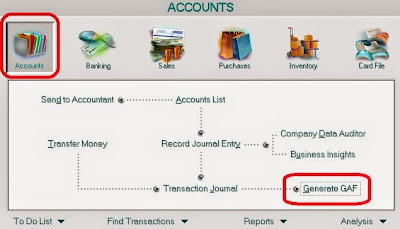
MYOB How to Generate GAF
On clicking GENERATE GAF, a new popup will appear requiring you to enter the period for the report (from what date to what date). On completing the dates entries, you will then need to click the DISK tab at the bottom left corner:
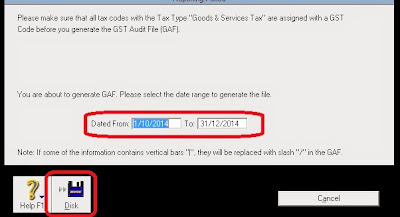
Enter dates for generating GAF report
On clicking DISK, you will then be able to save the GAF report in your computer. However, note that this file will be saved in a format which you will be unable to view. The GAF file need to be sent to the tax authority (in Malaysia case, it will be the Malaysian Custom or Jabatan Kastam Diraja Malaysia) and only them will be able to decode it to read and check.

Accounts list imported from Accountant file. Reconciliation

Case study. A company has imported Company File from its accountant. Its latest balance sheet is till end of 2013. Examination of, say, the bank account balance in above Balance Sheet did not tally with the bank account in the Accounts List. Reason: The balance in the Balance Sheet is till 31 December 2013 The balance in the Accounts List is up to date till a specific day in 2014, that is why the 2 figures do not tally. What to do? Answer: Get the Accounts Transaction (Accural) Report. There you will see all the transactions for 2014 up to date of the Accounts List given by the Accountant. How: Command Center > Accounts > Reports > Account Transaction [Accural] > Display (see screenshot below)
MYOB Account Transactions Accural Report

Search This Blog